
How to Make 1980s AI Photos With Your Own Picture
Learn how to make 1980s AI photos with your own picture using AI tools, retro outfits, vintage backgrounds, film effects, and detailed prompts.
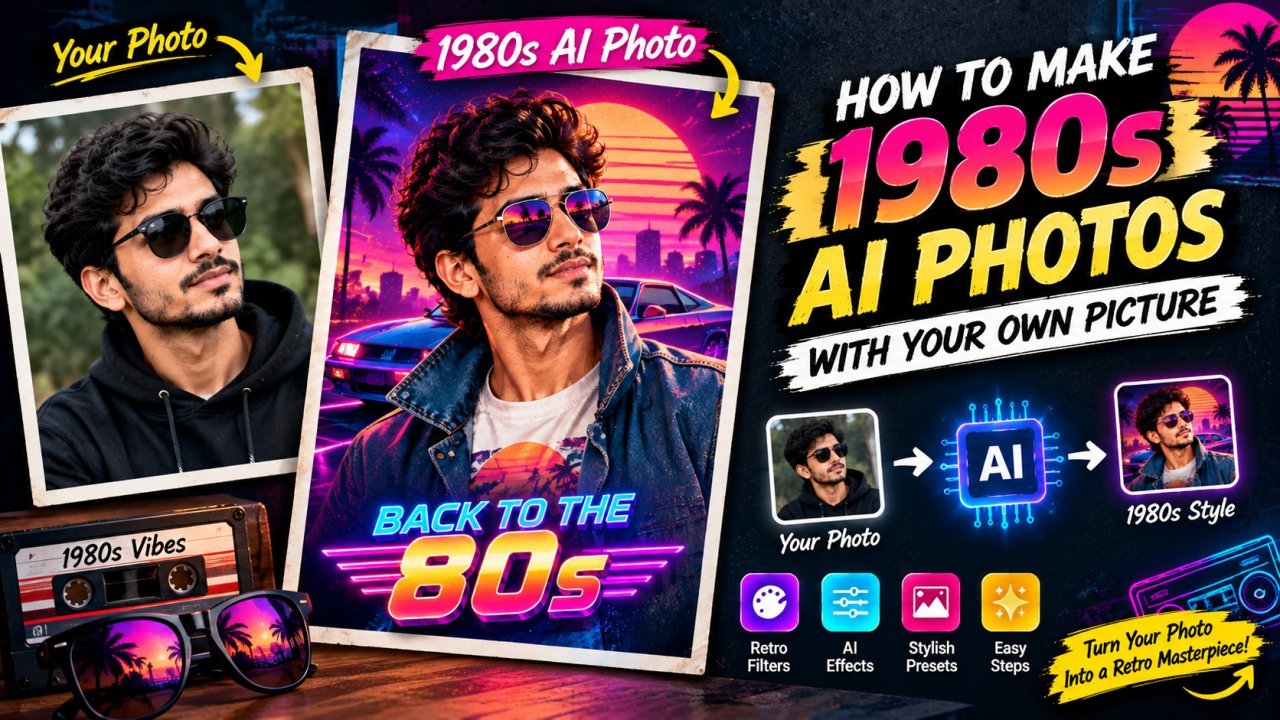
How to Make 1980s AI Photos With Your Own Picture
Want to see yourself as if you were photographed in the 1980s?
With modern AI image tools, you can transform your own picture into a convincing 1980s-style photo without manually recreating the entire scene. AI can help change the clothing, hairstyle, background, lighting, colors, camera style, and overall atmosphere while keeping your face recognizable.
The key to getting a good result is not simply asking an AI tool to "make this photo look 1980s." A detailed prompt usually gives you much more control over the final image.
In this guide, you will learn how to make 1980s AI photos with your own picture, how to choose the right source photo, how to write better prompts, how to create authentic-looking retro details, and how to avoid common AI mistakes.
What Is a 1980s AI Photo?
A 1980s AI photo is an image created or transformed with artificial intelligence to give it the appearance of a photograph from the 1980s.
The AI can recreate visual characteristics associated with that period, such as:
- All Tools
- Remove Background from Image — Free & Private
- YouTube Thumbnail Enhancer
- Vintage clothing
- 1980s hairstyles
- Analog camera appearance
- Film grain
- Flash photography
- Warm or slightly faded colors
- Retro interiors
- Old cars
- Classic furniture
- Vintage posters
- Period-appropriate accessories
- Soft image imperfections
- Studio portrait lighting
Instead of simply adding a basic vintage filter, AI can change several parts of an image at the same time.
For example, you could upload a modern portrait and ask an AI image editor to turn it into a 1980s studio portrait while preserving your facial features and overall identity.
Why Use Your Own Picture?
Using your own picture makes the result more personal.
Instead of generating a random person who happens to look like someone from the 1980s, you can provide a reference image and ask the AI to create a retro version of that person.
This can be useful for:
- Social media profile pictures
- Instagram posts
- Personal projects
- Retro-themed invitations
- Birthday designs
- Creative portraits
- YouTube thumbnails
- Blog images
- Family-themed projects
- Nostalgic photo concepts
The better your source photograph is, the easier it is for the AI to understand your face, pose, hairstyle, and overall appearance.
Step 1: Choose the Right Picture
Before creating a 1980s AI photo, start with a good-quality picture of yourself.
A clear portrait usually works better than a heavily compressed or extremely blurry image.
Look for a photo with:
- A clearly visible face
- Good lighting
- Minimal blur
- Reasonable image resolution
- A natural facial expression
- Limited obstruction around the face
- A simple background if possible
A front-facing or slightly angled portrait can be especially useful because the AI can understand facial structure more easily.
Avoid using:
- Very dark selfies
- Extremely low-resolution images
- Photos with heavy beauty filters
- Pictures where the face is covered
- Images with strong motion blur
- Group photos when you want only one person transformed
You do not necessarily need a professional studio photograph.
A normal smartphone portrait can work if the face is clear.
Step 2: Decide What Kind of 1980s Photo You Want
The 1980s were not visually identical everywhere.
A nightclub portrait, family photo, office portrait, school picture, street photograph, and studio photograph can all have very different looks.
Before writing your prompt, decide what kind of image you want.
1980s Studio Portrait
A classic portrait can include:
- Studio lighting
- Formal clothing
- Simple backdrop
- Flash photography
- Soft film texture
1980s Casual Photo
A relaxed personal photograph can include:
- Casual clothing
- Natural pose
- Home or street background
- Analog camera appearance
- Slight film grain
1980s Street Photo
A street-style image can include:
- Period clothing
- Old cars
- Shops and signs
- Urban streets
- Flash or natural daylight
- Analog film texture
1980s Party Photo
A retro party scene can include:
- Colorful clothing
- Classic hairstyles
- Direct flash
- Indoor party setting
- Slight motion
- Film grain
1980s Family Photo
A nostalgic family image can include:
- Period clothing
- Living room or outdoor setting
- Family-photo composition
- Soft flash
- Slightly faded colors
Choosing the style first makes your AI prompt much easier to write.
Step 3: Upload Your Own Picture
Open an AI image-generation or image-editing tool that supports image references or image uploads.
Look for an option such as:
- Upload image
- Add image
- Reference image
- Image-to-image
- Edit image
- Transform image
Upload your chosen photograph.
The exact buttons and features can differ between AI tools, so follow the current interface of the tool you are using.
The important thing is that the tool should support using your uploaded image as a visual reference.
Step 4: Tell the AI to Preserve Your Face
One of the most important parts of the prompt is explaining what should remain unchanged.
If you want the result to still look like you, tell the AI to preserve your recognizable facial characteristics.
For example:
"Transform this photo into a realistic 1980s portrait while preserving the person's recognizable facial features, facial structure, skin tone, and identity."
You can then describe the historical style you want.
This is generally more useful than simply saying:
"Make me look like I'm from the 1980s."
The second prompt gives the AI much less information about what you actually want.
Step 5: Describe the 1980s Clothing
Clothing has a major effect on whether an image feels like the 1980s.
Instead of saying only "retro clothes," describe the clothing more specifically.
For example:
"1980s casual fashion, denim jacket, simple shirt, high-waisted jeans, classic sneakers, period-appropriate styling."
Or:
"Elegant 1980s fashion, structured jacket, classic blouse, period-appropriate accessories, vintage styling."
You can also specify whether you want:
- Casual fashion
- Business clothing
- Sportswear
- Denim
- Formal clothing
- Party clothing
- School-style clothing
- Street fashion
The exact clothing should match the type of scene you are creating.
Step 6: Add a 1980s Hairstyle
Hair is another strong visual signal.
Depending on the person and the scene, you can describe:
- 1980s layered hairstyle
- Voluminous hair
- Retro curls
- Classic short haircut
- Side-parted hairstyle
- Period-appropriate styling
Avoid forcing a hairstyle that does not fit your desired look.
For example, if you want a realistic family portrait, an exaggerated hairstyle may make the image feel more like a costume than a genuine period photograph.
A better prompt can say:
"Give the subject a natural 1980s hairstyle appropriate for the person's appearance and the setting."
Step 7: Choose a 1980s Background
The background can make a major difference.
A modern room with an 80s filter may still look modern.
If you want a convincing retro image, describe the environment too.
You could use:
- 1980s living room
- Retro bedroom
- Vintage office
- Classic photography studio
- Old shopping street
- Arcade
- School environment
- Retro restaurant
- Family home
- Urban street with period cars
For example:
"Place the subject inside a realistic 1980s living room with period furniture, warm indoor lighting, vintage television, wooden furniture, and subtle retro decorations."
This gives the AI more visual information than simply saying "retro background."
Step 8: Add the Right Camera Look
A major part of the 1980s appearance comes from photography rather than clothing alone.
You can describe the image as:
- Analog photograph
- 1980s film photography
- Vintage camera look
- Direct flash photography
- Soft film grain
- Slightly imperfect exposure
- Natural film texture
- Subtle color fading
- Realistic photographic texture
For example:
"Shot as an authentic 1980s analog photograph with subtle film grain, realistic flash lighting, slightly soft focus, natural color variation, and gentle film imperfections."
The word "subtle" is useful.
If you ask for extreme grain, extreme fading, and extreme blur at the same time, the final image may become difficult to recognize.
Step 9: Use a Detailed Prompt
A strong 1980s AI photo prompt can contain several parts:
Subject + identity + clothing + hairstyle + environment + lighting + camera style + film texture + realism
Here is a general prompt template:
Transform my uploaded photo into a realistic 1980s photograph. Preserve my recognizable facial features and identity. Give me natural 1980s clothing and a period-appropriate hairstyle. Place me in a realistic 1980s environment with authentic furniture and background details. Use analog film photography, subtle film grain, realistic flash lighting, slightly soft focus, natural skin texture, gentle color fading, and authentic vintage photographic imperfections. Keep the result photorealistic and avoid modern objects or contemporary styling.
You can customize this template depending on the type of image you want.
Example Prompt: 1980s Studio Portrait
Transform my uploaded photo into a realistic 1980s professional studio portrait. Preserve my recognizable facial features, facial structure, skin tone, and identity. Give me natural 1980s clothing and a period-appropriate hairstyle. Use a simple professional studio background, classic portrait lighting, subtle direct flash, analog film texture, gentle film grain, slightly soft focus, realistic skin texture, and natural color variation. Make the photograph look like a genuine portrait taken with an analog camera in the 1980s, not a modern photo with a vintage filter.
Example Prompt: 1980s Casual Photo
Transform my uploaded photo into a realistic casual photograph from the 1980s. Preserve my recognizable face and identity. Give me authentic casual 1980s clothing, natural hair styling, and a relaxed pose. Place me in a realistic 1980s home environment with period furniture and objects. Use an analog camera look, subtle film grain, natural indoor lighting, slight flash, soft colors, realistic skin texture, and mild photographic imperfections. Avoid modern technology, modern clothing, and contemporary objects.
Example Prompt: 1980s Street Photo
Transform my uploaded photo into a realistic 1980s street photograph. Preserve my recognizable facial features and identity. Give me authentic 1980s clothing and hairstyle. Place me on a believable urban street with period-appropriate cars, storefronts, signs, architecture, and street details. Use realistic analog film photography, subtle grain, natural daylight, slightly imperfect exposure, soft colors, and authentic vintage photographic texture. Avoid modern cars, smartphones, modern logos, and contemporary architecture.
Step 10: Check the First Result
Do not expect the first AI-generated result to be perfect.
Look at the image carefully.
Check:
- Does the face still look like you?
- Is the hairstyle believable?
- Does the clothing look appropriate?
- Does the background look like the 1980s?
- Are there modern objects?
- Are hands and fingers correct?
- Does the skin look natural?
- Is the image too smooth?
- Is the film grain too strong?
- Does the lighting look realistic?
If something is wrong, change the prompt instead of completely starting over.
Step 11: Fix One Problem at a Time
Suppose the face looks good but the clothing looks modern.
Do not rewrite everything.
Add a specific instruction:
Replace the modern clothing with authentic 1980s casual clothing while preserving the person's face and pose.
If the background looks modern:
Replace the background with a realistic 1980s interior and remove modern objects.
If the image looks too artificial:
Reduce the AI-generated appearance and create a more natural analog photograph with subtle film imperfections.
Small prompt changes can sometimes produce more controlled results than adding a large number of instructions at once.
Common Mistakes to Avoid
1. Using Only the Word "Retro"
"Retro" is too broad.
Instead of:
Make this retro.
Try:
Create a realistic 1980s analog photograph with period-appropriate clothing, hairstyle, background, flash lighting, and subtle film grain.
2. Adding Too Many Effects
A good 1980s photograph does not need every vintage effect at maximum strength.
Avoid combining:
- Heavy grain
- Strong blur
- Extreme color fading
- Strong scratches
- Heavy vignette
- Excessive noise
- Oversaturated colors
These effects can make the image look like a filter rather than a believable photograph.
3. Forgetting Modern Objects
AI may accidentally add:
- Smartphones
- Modern cars
- Contemporary furniture
- Modern computers
- Current logos
- Modern clothing
- Recent technology
If historical accuracy matters, explicitly tell the AI to avoid modern objects.
4. Changing Your Face Too Much
If your goal is to create a retro version of your own photograph, the result should still resemble you.
Use instructions such as:
Preserve the person's recognizable facial features and identity.
If the tool has settings for reference strength or identity preservation, experiment with them according to the tool's current documentation.
Quick Beginner Workflow
If you want the simplest possible process:
1. Choose a clear photo of yourself.
2. Upload it to an AI image editor that supports image references.
3. Choose a 1980s style.
4. Describe the clothing.
5. Describe the hairstyle.
6. Describe the background.
7. Add analog camera and film details.
8. Tell the AI to preserve your recognizable face.
9. Generate the image.
10. Fix problems with a second prompt.
This is enough to create a strong starting point for a personalized 1980s AI photo.
Final Takeaway
The quality of a 1980s AI photo depends on more than adding a vintage filter.
For a convincing result, think about the entire photograph:
Your picture + facial identity + 1980s clothing + hairstyle + background + lighting + analog camera look + subtle film texture
Start with a clear source image and describe the exact style you want. Keep the retro effects controlled so the final image still looks like a real photograph.
How to Make 1980s AI Photos With Your Own Picture: Advanced Guide
Creating a basic 1980s AI photo is fairly simple, but getting a result that actually feels like a real photograph from the 1980s requires more attention to detail.
The biggest difference between a basic AI image and a convincing retro image comes from the small details. Clothing, hairstyles, lighting, camera characteristics, background objects, colors, film grain, and even the way the photograph is composed can all affect the final result.
In Part 1, we covered the basics of choosing your photo, uploading it, writing a prompt, selecting clothing and hairstyles, and creating a suitable background.
In this part, we will go deeper into advanced techniques for creating more realistic 1980s AI photos with your own picture.
Create Different 1980s AI Photo Styles
One of the easiest ways to get more interesting results is to create different versions of the same photo.
Instead of using one generic 1980s prompt, try different photography styles.
1980s Yearbook Photo
A yearbook-style image can include:
- Simple studio background
- Formal or semi-formal clothing
- Direct portrait lighting
- Natural facial expression
- Slight film grain
- Soft analog colors
- Classic school-photo composition
Example prompt:
Transform my uploaded photo into a realistic 1980s school yearbook portrait. Preserve my recognizable facial features and identity. Use period-appropriate clothing and hairstyle, a simple studio background, direct portrait lighting, subtle analog film grain, slightly faded colors, natural skin texture, and realistic photographic imperfections. Make it look like an authentic school portrait from the 1980s.
Create a 1980s Family Photograph
Family photographs from the 1980s often have a different appearance from professional studio portraits.
The image can feel more casual and personal.
Try adding:
- Living room
- Family furniture
- Warm indoor lighting
- Direct camera flash
- Casual poses
- Period clothing
- Slight film imperfections
Example prompt:
Transform my uploaded picture into a realistic 1980s family photograph. Preserve my recognizable face and identity. Place me in a warm 1980s home with period furniture, a vintage television, wooden cabinets, family decorations, and realistic indoor lighting. Use authentic 1980s clothing, natural posing, direct camera flash, subtle film grain, slightly faded colors, and realistic analog photography.
Create a 1980s Couple Photo
If you want to create a couple photograph, upload appropriate reference images and clearly describe how the people should appear together.
For example:
Create a realistic 1980s couple photograph using the uploaded reference images. Preserve both people's recognizable facial features and identities. Give them authentic 1980s clothing and hairstyles. Place them in a realistic retro environment with period furniture and decorations. Use analog film photography, direct flash, subtle grain, natural skin texture, slightly faded colors, and realistic photographic imperfections.
When using multiple people, check the generated image carefully because AI tools can sometimes change facial details or mix characteristics between subjects.
Create a 1980s Professional Portrait
You can also make your own image look like a professional business portrait from the decade.
Use details such as:
- Formal jacket
- Classic shirt or blouse
- Studio background
- Professional lighting
- Analog film
- Subtle grain
- Conservative composition
Example:
Transform my uploaded photo into a realistic 1980s professional business portrait. Preserve my recognizable facial features and identity. Give me authentic period-appropriate professional clothing and hairstyle. Use a simple studio background, classic portrait lighting, subtle direct flash, analog film texture, natural skin detail, mild film grain, and realistic colors. Avoid modern clothing and modern photography aesthetics.
Create a Cinematic 1980s Photo
If you want something more dramatic, you can create a cinematic scene rather than a normal portrait.
Think about:
- Night streets
- Neon signs
- Vintage cars
- Retro clothing
- Rainy streets
- Dramatic lighting
- Film photography
- Atmospheric backgrounds
Example prompt:
Transform my uploaded photo into a cinematic 1980s street photograph. Preserve my recognizable facial features and identity. Place me on a nighttime urban street with period-appropriate cars, storefronts, neon signs, and architecture. Give me authentic 1980s clothing and hairstyle. Use cinematic analog film photography, realistic practical lighting, subtle film grain, natural skin texture, slightly faded colors, and authentic photographic imperfections. Avoid modern vehicles, smartphones, and contemporary buildings.
Use Negative Instructions
Some AI image tools respond well when you clearly describe things you do not want.
This can help prevent modern objects from appearing in your 1980s scene.
For example:
Avoid smartphones, modern cars, modern computers, contemporary clothing, modern furniture, current logos, modern architecture, excessive digital sharpness, and artificial-looking skin.
Negative instructions are especially useful when the AI keeps adding modern objects.
However, do not add dozens of negative instructions unnecessarily.
Keep them focused on the problems you actually see.
Make the Image Look Like Film
One of the biggest mistakes people make is adding too much film grain.
Realistic film photography does not necessarily need extreme noise.
Instead, try combining several subtle characteristics:
- Fine film grain
- Slight softness
- Mild color variation
- Natural exposure differences
- Slightly muted colors
- Gentle highlights
- Realistic shadows
- Small photographic imperfections
For example:
Use subtle fine-grain analog film texture, slightly soft optical rendering, natural exposure variation, gentle color fading, realistic highlights and shadows, and authentic photographic imperfections.
This usually creates a more natural result than simply asking for "heavy film grain."
Use Flash Photography for an Authentic Retro Look
Direct flash is another useful detail for certain 1980s photo styles.
It can work particularly well for:
- Party photos
- Family snapshots
- Casual portraits
- Nighttime photographs
- Indoor photographs
Try:
Use realistic direct on-camera flash with natural falloff, subtle background shadows, and authentic 1980s snapshot photography.
Avoid asking for extreme flash unless you specifically want a dramatic effect.
Make the Background Historically Consistent
A convincing 1980s photograph needs more than retro clothing.
Look carefully at the background.
Modern objects can immediately make the image feel contemporary.
For a stronger period look, mention things such as:
- CRT television
- Analog electronics
- Wooden furniture
- Vintage posters
- Period vehicles
- Older storefronts
- Retro telephones
- Cassette players
- Classic appliances
- Period-appropriate signs
For example:
Create a realistic 1980s living room with a CRT television, wooden furniture, analog electronics, period decorations, vintage telephone, and warm indoor lighting. Do not include modern flat-screen televisions, smartphones, or contemporary furniture.
This gives the AI clear visual boundaries.
Improve the Face Without Making It Look Artificial
AI image tools can sometimes make faces look overly smooth.
The result may look more like a digital portrait than an old photograph.
Instead of asking for perfect skin, ask for realistic skin texture.
Use wording such as:
Preserve natural skin texture, realistic facial details, subtle imperfections, and authentic analog photographic rendering.
Avoid:
Perfect skin, flawless face, ultra-smooth skin.
The second approach can produce an overly polished result.
Keep Your Original Identity
If your main goal is to transform your own photograph, identity preservation should remain a priority.
Your prompt can include:
Preserve the person's recognizable facial structure, facial proportions, skin tone, hairstyle characteristics, and overall identity while changing the clothing, environment, and photographic style.
However, AI tools vary in how accurately they preserve identity.
If the first result changes your face significantly, try:
- A clearer reference image
- A closer portrait
- A stronger image-reference setting if available
- A more specific prompt
- Less dramatic pose changes
Try Different Camera Angles
You do not always have to keep the original pose.
You can experiment with:
- Head-and-shoulders portrait
- Full-body photograph
- Sitting portrait
- Standing street photo
- Looking toward the camera
- Looking slightly away
- Side profile
- Casual snapshot
For example:
Create a waist-up 1980s portrait with the subject standing naturally and looking slightly toward the camera.
Be aware that major pose changes can make identity preservation more difficult.
Create a 1980s Passport or ID-Style Portrait
If you want a simple historical portrait, try an old identification-photo style.
Example:
Transform my uploaded photo into a realistic 1980s identification-style portrait. Preserve my recognizable facial features and identity. Use a simple plain background, centered composition, period-appropriate clothing, straightforward lighting, subtle analog film texture, natural skin detail, and slightly faded colors. Make the photograph look like an authentic printed portrait from the 1980s.
Do not present a generated image as a genuine historical document or use it to misrepresent an actual identity or document.
Create a 1980s Polaroid-Style Photo
For a more nostalgic look, you can request an instant-film-inspired photograph.
Try:
Transform my uploaded photo into a nostalgic 1980s instant-film-style photograph. Preserve my recognizable facial features and identity. Use authentic period clothing, casual composition, direct flash, slightly soft focus, subtle instant-film color characteristics, natural imperfections, and a realistic vintage snapshot appearance.
The exact appearance of instant film can vary, so describe the characteristics you want instead of relying only on the word "Polaroid."
Create a Vintage Mall or Shopping Photo
A shopping-mall scene can give your image a strong retro atmosphere.
You can include:
- Older storefronts
- Vintage clothing
- Indoor mall lighting
- Classic signs
- Period advertisements
- Old furniture
- Retro accessories
Example:
Transform my uploaded picture into a realistic 1980s shopping mall photograph. Preserve my recognizable face and identity. Give me authentic 1980s clothing and hairstyle. Place me inside a period-appropriate shopping mall with vintage storefronts, advertisements, signs, furniture, and lighting. Use analog film photography, subtle grain, direct flash, realistic skin texture, slightly faded colors, and natural photographic imperfections.
Create a 1980s Arcade Photo
Gaming and arcade scenes can work especially well with the 1980s aesthetic.
Example:
Transform my uploaded photo into a realistic 1980s arcade photograph. Preserve my recognizable facial features and identity. Give me authentic 1980s casual clothing and hairstyle. Place me inside a vintage arcade with period-appropriate arcade machines, colorful lights, classic carpet patterns, and realistic indoor lighting. Use direct flash photography, subtle analog film grain, natural skin texture, slightly imperfect exposure, and authentic 1980s photographic characteristics. Avoid modern gaming equipment.
Create Multiple Versions
Do not rely on a single generated image.
Create several variations using the same source photo.
For example:
Version 1
1980s studio portrait
Version 2
1980s family photograph
Version 3
1980s street photograph
Version 4
1980s arcade photo
Version 5
1980s cinematic portrait
Version 6
1980s yearbook photograph
This gives you different creative options without needing a completely different source photo.
How to Make AI 1980s Photos Look Less AI-Generated
The biggest goal is often to make the result feel like a photograph rather than an AI illustration.
Try including:
- Natural skin texture
- Realistic lighting
- Subtle film grain
- Slight lens softness
- Natural facial imperfections
- Realistic shadows
- Imperfect exposure
- Period-appropriate objects
- Natural poses
- Slight color variation
Avoid overusing:
- Ultra sharp details
- Perfect skin
- Unrealistic eyes
- Extreme HDR
- Excessive saturation
- Heavy artificial grain
- Plastic-looking textures
A little imperfection can actually make a retro photograph feel more believable.
Fix Common AI Problems
Problem 1: The Face Does Not Look Like You
Try:
Preserve the uploaded person's recognizable facial structure, facial proportions, skin tone, and identity. Change only the clothing, environment, hairstyle, and photographic style.
If your tool has an image-reference or identity-strength control, you can also adjust that setting.
Problem 2: The Image Looks Too Modern
Add:
Remove modern visual elements and replace them with authentic 1980s clothing, furniture, technology, vehicles, architecture, and photography characteristics.
Problem 3: The Image Looks Like a Filter
Add more environmental and photographic details:
Create a genuine analog photograph with period-appropriate clothing, realistic 1980s surroundings, direct flash, natural film grain, slight optical softness, and authentic photographic imperfections rather than applying a simple vintage color filter.
Problem 4: The Image Is Too Grainy
Use:
Reduce the film grain to a subtle fine texture while preserving realistic analog photographic characteristics.
Problem 5: The Colors Are Too Strong
Try:
Use natural slightly muted analog film colors with gentle contrast and realistic skin tones.
Problem 6: The Background Contains Modern Objects
Try:
Remove all visible modern objects and replace them with period-appropriate 1980s objects and environmental details.
Advanced Prompt Formula
For more consistent results, build your prompt using this structure:
Reference + Identity + Era + Subject + Clothing + Hair + Location + Objects + Lighting + Camera + Film + Composition + Negative Instructions
Example:
Use my uploaded image as the primary identity reference. Preserve my recognizable facial features and overall identity. Create a realistic photograph set in the 1980s. Give me authentic period-appropriate clothing and hairstyle. Place me in a realistic 1980s urban environment with period vehicles, storefronts, signs, and architecture. Use natural analog photography with direct flash, subtle fine film grain, slightly soft optical rendering, realistic skin texture, gentle color fading, natural shadows, and imperfect exposure. Keep the composition photographic and believable. Avoid smartphones, modern vehicles, modern buildings, contemporary clothing, excessive digital sharpness, plastic-looking skin, and unrealistic AI artifacts.
This formula can be adapted to almost any 1980s photo concept.
Use Aspect Ratio for Different Purposes
The aspect ratio can affect how your image works on different platforms.
Portrait Social Media Image
Use a vertical composition when the image is primarily intended for a social media post or profile.
YouTube Thumbnail
Use a wide landscape composition and keep the main subject clearly visible.
Wallpaper
Choose an aspect ratio appropriate for the target screen.
Profile Picture
Use a close-up or square-friendly composition with enough space around the face.
If your AI tool allows you to choose an aspect ratio, decide this before generating the final image.
Improve the Image After Generation
The AI-generated result may still need some editing.
You can use a normal image editor to make small adjustments such as:
- Cropping
- Brightness
- Contrast
- Exposure
- Color balance
- Sharpness
- Noise reduction
- Resizing
Keep the changes moderate.
If the purpose is to create an authentic-looking 1980s photograph, avoid making the image extremely sharp and digitally polished after generation.
Use a Two-Step Workflow
For better control, you can separate the process into two stages.
Stage 1: Create the Scene
First focus on:
- Face
- Clothing
- Hairstyle
- Background
- Pose
- Lighting
Stage 2: Add the Photographic Character
Then refine:
- Film grain
- Color
- Softness
- Exposure
- Analog texture
- Flash characteristics
This can be easier than asking the AI to handle everything at once.
Best Practices for Better Results
Keep these tips in mind:
- Start with a clear source photograph.
- Use a detailed but focused prompt.
- Describe the 1980s environment, not just the clothing.
- Tell the AI what facial characteristics to preserve.
- Use subtle film effects.
- Avoid excessive grain.
- Remove modern objects.
- Generate multiple variations.
- Fix one problem at a time.
- Compare the result with your original photo.
- Check hands, eyes, hair, clothing, and background carefully.
- Choose the final image based on natural-looking details rather than the amount of vintage effects.
1980s AI Photo Prompt Cheat Sheet
Here are useful prompt phrases you can combine.
Era
- Authentic 1980s
- Late 1980s
- Early 1980s
- Period-appropriate
- Retro 1980s atmosphere
Camera
- Analog camera
- Film photography
- Direct flash
- Slight optical softness
- Natural exposure variation
Texture
- Fine film grain
- Subtle film texture
- Slightly faded colors
- Natural photographic imperfections
Clothing
- 1980s casual fashion
- Vintage denim
- Period-appropriate formalwear
- Classic sportswear
- Retro street fashion
Background
- 1980s living room
- Vintage office
- Old shopping mall
- Retro arcade
- Urban street
- Classic studio
Quality
- Photorealistic
- Natural skin texture
- Realistic lighting
- Authentic photographic appearance
- Natural facial details
Avoid
- Modern smartphones
- Modern cars
- Contemporary furniture
- Modern clothing
- Excessive HDR
- Plastic skin
- Overly strong film effects
Complete Advanced Workflow
Here is a complete workflow you can follow from beginning to end.
Step 1: Select Your Photo
Choose a clear image where your face is easy to see.
Step 2: Choose Your Concept
Decide whether you want a studio portrait, family photograph, street scene, yearbook image, arcade photo, or cinematic portrait.
Step 3: Upload the Image
Use an AI tool that supports image references or image editing.
Step 4: Preserve Identity
Tell the AI to keep your recognizable facial characteristics.
Step 5: Define the Era
Clearly mention that the photograph should look like it was taken in the 1980s.
Step 6: Define Clothing
Describe specific period-appropriate clothing.
Step 7: Define Hairstyle
Choose a hairstyle that fits the person and the scene.
Step 8: Define the Environment
Add furniture, vehicles, technology, signs, architecture, and other appropriate details.
Step 9: Define Photography
Add analog camera characteristics, lighting, film texture, and subtle imperfections.
Step 10: Generate Multiple Versions
Create several variations instead of relying on one result.
Step 11: Check the Details
Look at the face, hands, clothing, background, objects, lighting, and film texture.
Step 12: Correct Problems
Use targeted follow-up prompts.
Step 13: Final Edit
Crop, resize, or make small color and exposure adjustments if needed.
Step 14: Export
Save the final image in an appropriate quality and format for its intended use.
Final Part 2 Summary
Creating a convincing 1980s AI photo with your own picture is mainly about controlling the details.
The strongest results usually combine:
Your original picture + identity preservation + authentic 1980s clothing + period hairstyle + historical environment + realistic lighting + analog camera characteristics + subtle film texture
Do not rely on the word "retro" alone.
Instead, describe exactly what you want the AI to change and what you want it to preserve.
Most importantly, keep the effects controlled. A realistic 1980s photograph should not necessarily look heavily filtered. Small imperfections, natural lighting, period-appropriate objects, and subtle film characteristics can often make the image feel more believable.
Once you have a good base image, you can create different versions for social media, profile pictures, YouTube thumbnails, wallpapers, personal projects, and creative retro designs.
The goal is not simply to make a modern photo look old. The goal is to create a believable 1980s photographic experience while keeping your own identity recognizable.
Part 3: Conclusion, FAQs, Schema, Links & SEO Checklist
Conclusion
Learning how to make 1980s AI photos with your own picture is easier when you focus on the complete visual story rather than adding a simple vintage filter.
A convincing 1980s-style image usually combines several elements:
- Your original photo
- Recognizable facial features
- Period-appropriate clothing
- A suitable 1980s hairstyle
- A believable retro background
- Analog camera characteristics
- Natural lighting
- Subtle film grain
- Slight color fading
- Realistic photographic imperfections
The most important part is choosing a good reference image. A clear photograph gives the AI more information about your face and makes it easier to create a recognizable result.
Your prompt also matters. Instead of writing only "make this photo look 1980s," explain the clothing, hairstyle, environment, lighting, camera style, and film characteristics you want.
You should also avoid adding too many effects. Heavy grain, extreme blur, strong color changes, and excessive sharpening can make the image look artificial.
For the most natural result, think about what a real photograph from the 1980s might have looked like. The image does not need to be perfect. Small imperfections can actually make the result feel more authentic.
The basic formula is:
Your picture + identity preservation + 1980s styling + period background + analog photography + subtle film texture = a more convincing 1980s AI photo
Whether you want a vintage portrait, family photograph, yearbook image, arcade scene, street photograph, or cinematic retro image, the same basic principles can be adapted to different styles.
Key Takeaways
Here are the most important points from this guide:
- Start with a clear photo of yourself.
- Use an AI tool that supports image references or image editing.
- Tell the AI to preserve your recognizable identity.
- Describe the exact 1980s style you want.
- Choose period-appropriate clothing.
- Add a suitable 1980s hairstyle.
- Create a believable historical background.
- Include appropriate objects and technology.
- Use analog photography characteristics.
- Keep film grain subtle.
- Avoid excessive vintage effects.
- Remove modern objects when historical accuracy matters.
- Generate multiple versions.
- Fix one problem at a time.
- Check the face, hands, clothing, lighting, and background.
- Make small edits after generation if necessary.
Simple 1980s AI Photo Formula
If you want a quick formula for writing your own prompt, use:
Reference Image + Identity + Era + Clothing + Hairstyle + Background + Lighting + Camera + Film Texture + Negative Instructions
For example:
Use my uploaded photo as the identity reference. Preserve my recognizable facial features and identity. Create a realistic photograph from the 1980s with authentic period clothing, a natural 1980s hairstyle, and a believable retro environment. Use analog film photography, realistic lighting, subtle film grain, slightly soft focus, natural skin texture, gentle color fading, and authentic photographic imperfections. Avoid modern cars, smartphones, contemporary clothing, modern furniture, and excessive digital effects.
This structure can be adapted to almost any 1980s AI photo concept.
Frequently Asked Questions
1. How can I make 1980s AI photos with my own picture?
Upload a clear photo of yourself to an AI image editor that supports image references. Then describe the 1980s clothing, hairstyle, background, lighting, camera style, and film effects you want. Ask the AI to preserve your recognizable facial features and identity.
2. Can I turn my normal photo into an 80s photo with AI?
Yes. AI image editing tools can transform a modern photograph into a retro 1980s-style image by changing visual elements such as clothing, hairstyle, background, lighting, colors, and photographic texture.
3. What kind of photo works best for a 1980s AI transformation?
A clear portrait with good lighting, a visible face, reasonable resolution, and minimal blur usually works well. A simple background can also make it easier for the AI to understand the subject.
4. How do I make my AI photo look like a real 1980s photograph?
Describe more than just the word "retro." Include period-appropriate clothing, hairstyles, backgrounds, analog camera characteristics, direct flash, subtle film grain, slightly faded colors, and natural photographic imperfections.
5. What prompt should I use for a 1980s AI photo?
A useful prompt is:
Transform my uploaded photo into a realistic 1980s photograph. Preserve my recognizable facial features and identity. Give me authentic 1980s clothing and a period-appropriate hairstyle. Place me in a realistic 1980s environment. Use analog film photography, subtle film grain, realistic lighting, slightly soft focus, natural skin texture, gentle color fading, and authentic photographic imperfections. Avoid modern objects and contemporary styling.
6. How do I keep my face recognizable in an AI-generated 1980s photo?
Use a clear reference image and specifically tell the AI to preserve your recognizable facial features, facial structure, skin tone, and identity. If the AI tool offers image-reference or identity-strength controls, those may also help.
7. Why does my 1980s AI photo look too modern?
The AI may not have enough information about the historical setting. Add details about period clothing, hairstyles, furniture, vehicles, technology, architecture, lighting, and analog photography. You can also tell the AI to remove modern objects.
8. How do I make an AI photo look less artificial?
Use natural skin texture, realistic lighting, subtle film grain, mild color variation, and slightly imperfect photographic characteristics. Avoid excessive sharpening, perfect skin, extreme HDR, and heavy artificial effects.
9. Can I make a 1980s family photo with AI?
Yes. You can use family reference images and describe a period-appropriate home, clothing, hairstyles, furniture, lighting, and camera style. Check the generated faces carefully because AI tools can sometimes alter individual facial characteristics.
10. Can I create different 1980s styles from the same picture?
Yes. The same reference photo can be used to create different concepts such as a studio portrait, yearbook photo, family photograph, arcade scene, street photograph, professional portrait, or cinematic 1980s scene.
Ready to optimize your images?
Every tool mentioned in this article is free to use. No upload, no signup, and no watermarks — ever.
Try our free toolsRelated articles
How to Turn Your Photo Into a 1980s Vintage Photo With AI
Learn how to turn your photo into a 1980s vintage photo with AI using retro outfits, film effects, old cameras, vintage backgrounds, and realistic prompts.
How to Remove Unwanted Objects From Photos With AI: Easy Guide
Learn how to remove unwanted objects from photos with AI using simple editing techniques. Discover how AI object removal works, useful tips, common mistakes, and ways to get natural-looking results.
How to Make Cricket Player Photos HD for Social Media
Learn how to make cricket player photos HD for social media using AI upscaling, sharpening, cropping, and the right export settings.