
How AI Background Removers Actually Work (Explained Simply)
Behind that magical 2-second background removal is a neural network making millions of decisions. Here's a non-technical look at what's actually happening.
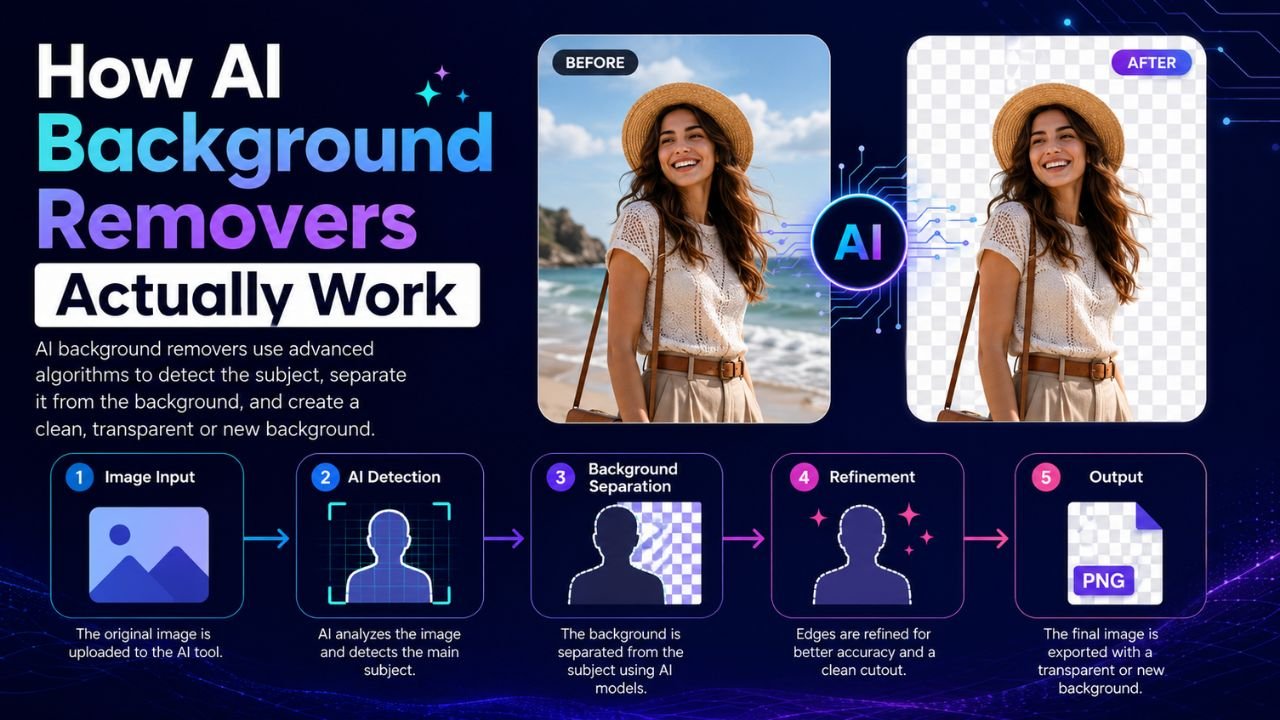
You drop a photo into a background remover. Two seconds later, the subject is cleanly isolated — hair edges, fingers, even glass surfaces handled correctly. How?
The short answer: a neural network trained on millions of examples learned what "foreground" looks like, and what "background" looks like, and the boundary between them. The longer answer is more interesting.
It used to take a Pen Tool and 10 minutes
Before AI, background removal meant painstaking work in Photoshop:
- Outline the subject with the Pen Tool (anchor points placed every few pixels)
- Manually paint the alpha channel where hair feathered out
- Use Refine Edge to smooth the mask
- Spend another five minutes fixing missed bits
A professional retoucher could clear a clean product shot in 5 minutes, a portrait with hair in 15-20 minutes. Today, a smartphone does the same job in 2 seconds. Same outcome, 100× faster.
What's inside an AI background remover
Most modern tools (including our free Background Remover) use a variation of the U-Net architecture — a neural network shaped like the letter U:
- The left side progressively shrinks the image while extracting features (edges, textures, shapes, colours, then higher-level concepts like "person", "object", "sky")
- The right side progressively rebuilds an image at full resolution, but this time the output is a mask — black for background, white for foreground
- Skip connections between the two sides preserve fine detail (like individual hair strands) that pure shrink-then-grow would lose
The model isn't drawing the outline like a human artist. It's saying, for every single pixel: "Is this part of the subject? Probability: 0.0 to 1.0." Then a threshold (usually 0.5) converts the probability map into a binary mask.
Why it handles hair so well now
The "impossible" case for traditional editing was always hair — thousands of fine strands with semi-transparent edges against a background.
Modern AI handles hair by:
- Soft mask output — instead of hard binary 0/1, the model outputs values between 0 and 1, so a strand of hair can be "70% foreground"
- Training on hair-rich data — models like U2-Net were trained on thousands of portraits with hand-labelled hair masks
- Edge refinement post-processing — a second smaller network specifically smooths and refines edges after the main mask is computed
The result: hair strands now blend naturally onto new backgrounds, instead of looking like they were cut out with scissors.
What "browser-side AI" actually means
Until 2022, AI background removers all ran in the cloud — you uploaded your image to a server, the AI ran there, and a result came back. Three reasons this was bad:
- Slow — every image required a round-trip
- Privacy hostile — your photos sat on someone else's servers
- Expensive to operate — GPU servers cost real money to run
In 2023-2024, the AI community started compressing ("quantizing") these models so they could run on consumer hardware in the browser. The trick: convert the neural network's weights from 32-bit floats to 8-bit integers, with very little quality loss. The model shrinks ~4×, and modern phones/laptops can run it locally.
Our Background Remover does exactly this — the AI model and inference happen inside your browser. Nothing uploads anywhere. Same neural architecture as the paid cloud services, just running on your GPU.
When AI background removers fail (and why)
No model is perfect. Common failure modes:
- Glass and transparency — AI treats transparent areas as either fully foreground or fully background. Half-transparent wine glasses, sunglasses lenses, etc., often need touch-up.
- Camouflage colours — a person wearing a green shirt photographed against a green wall confuses the model
- Motion blur — when the subject's edges are blurry, the AI has no clean boundary to find
- Unusual subjects — most models are trained mainly on people, animals, and common products. Niche subjects (plant cells, abstract art, microscopy) may confuse them.
For these cases, no current AI tool will produce a perfect result — manual touch-up is still needed.
What's next
The 2026-2027 frontier for AI background removal:
- Video background removal at 60fps with temporal consistency (no flicker between frames)
- Multi-layer outputs — separating not just foreground from background but each foreground object onto its own layer
- Generative replacement — the AI generates a new background that matches the foreground's lighting and perspective automatically
The trend is clear: what took a professional retoucher 15 minutes in 2018 is now a 2-second click. What still takes 15 minutes in 2026 will take 2 seconds by 2028.
Want to try the tech yourself? Our free Background Remover runs entirely in your browser — no upload, no signup, your photos never leave your device.
Ready to optimize your images?
Every tool mentioned in this article is free to use. No upload, no signup, no watermarks on small files.
Try our free toolsRelated articles
Best AI Image Enhancer Tools in 2026 (Free + Paid Compared)
Eight AI image enhancers tested on the same blurry, low-res, and noisy photos. Some made the cut. Most didn't. Here's what actually works in 2026.

AI vs Manual Photo Editing — Which One Should You Use in 2026?
The honest answer isn't 'AI always wins'. We compared 12 common editing tasks across speed, quality, and control — here's where each approach actually beats the other.

Top Free AI Image Generators for Creators in 2026
Eight free AI image generators tested side-by-side on the same five prompts. Some are surprisingly good. Two should not exist. Here's the honest rundown.